Structured outputs with small local models
A few years ago, when GPT-4 had just been released, I had the opportunity to work on a project involving small open source LLMs. Good models were scarce and I did not have the infrastructure to run the largest ones.
My problem was to take a query in natural language as input, and call an API to fetch the required data. This means turning free-form text into a structured format like JSON. Basically, I needed structured generation when it did not exist yet.
Today, I wanted to explore how it can improve small models.
Making LLM output specific structures
You have probably heard about structured generation for some time, if not, you sure have benefited from it without knowing.
Language models can follow instructions to perform various tasks, which makes them exceptionally useful and versatile. However, you may have noticed they always answer the same question in a slightly different way. This makes interactions feel more natural, but it is an issue when interacting with external systems which expect specific formats. Back in early 2023, we had to use a large prompt, few-shot learning, and clever parsing to make sure the output was a valid JSON, but with no guarantee.
That is what structured generation is for: ensuring that a model always produces outputs that follow a predefined structure. AI agents rely on it extensively today to call external APIs and interact with the outside world via function calling.
Several projects emerged in the open-source community around mid-2023, and OpenAI introduced their Structured Output API in August 2024. These are based on a technique called constrained decoding.
What is Constrained decoding?
Language models work by sampling tokens from their vocabulary, which we call the support. The more relevant a token is, the more likely it is to be sampled. Constrained decoding works by restricting the support to a subset of tokens compliant with the provided format. Outlines, an open source constrained decoding library, explains it in detail in their blog post Coalescence: making LLM inference 5x faster.
To restrict the support, i.e the tokens the model can sample from, constrained decoding applies a mask. This mask sets the probability of non-valid tokens to zero (see Figure 1).
 Figure 1. Masking to decode the first token
This means that constrained decoding needs access to the token probabilities at each decoding step. So it must live where the decoder is. Hence why constrained decoding usually happens in the inference server.
Open source inference engines like vLLM or TGI enable constrained decoding using the same API as OpenAI. To do so, they leverage tools like xgrammar, LLGuidance (vLLM), or outlines (TGI).
However these engines are designed to work with GPUs, what if I want to run models locally? Luckily, local engines like llama.cpp, Ollama, or LM Studio, also implement this feature using the same tools.
Although it’s interesting to know how this works, you will likely not use a library like outlines (or its equivalent) in your application code, but interact with it through an API, and your inference server will call it.
So why am I telling you this? Because it personally took me some time to understand where constrained decoding happens. Actually nothing prevents you from using outlines on the client side but this will just delegate constrained decoding to OpenAI via their structured output API by adding a response_format argument. It will also add a few MB of dependencies to your application for nothing (no, that never happened to me…).
Using small language models
Small language models (under ~7B) have limited reasoning capabilities yet they improved dramatically in the last 2 years, gaining abilities like thinking and vision. In addition to that, their speed and small memory footprint makes them ideal to run on a laptop. Their limited ability to follow complex instructions makes them benefit greatly from constrained decoding.
Experiment: Document Understanding
Document understanding involves extracting text from a picture, and then structuring it. It is usually applied on forms where values must be matched to their respective keys. Usually, it requires chaining two models, one to extract the text (like Tesseract), and then another to perform matching (a LLM, or just a regex sometimes). Today, Visual Language Models can do it in one pass.
To put structured generation to the test, I ran an experiment using a VLM locally served with LM Studio. I used Qwen3-VL-2B-Instruct quantized in 8 bits, which offers a good trade-off between speed, performance, and memory. The model is compiled using MLX, which uses outlines as engine for structured outputs in LM Studio.
The model must generate a JSON from the image of an invoice. Code is available at https://github.com/AnOtterGithubUser/structured_generation_with_small_models.
Baseline: Prompting
I defined the expected Invoice schema as a Pydantic model
Check Pydantic models
class Invoice(BaseModel):
    number: str
    issue_date: date
    seller: Seller
    client: Client
    items: list[Item]
    summary: Summary

class Address(BaseModel):
    street_number: str
    street_name: str
    address_line_2: Optional[str] = None
    city: str
    state: str
    zip_code: str

class Seller(BaseModel):
    name: str
    address: Address
    tax_id: str
    iban: str


class Client(BaseModel):
    name: str
    address: Address
    tax_id: str


class Item(BaseModel):
    number: int
    description: str
    quantity: float
    unit_of_measure: str
    net_price: float
    net_worth: float
    vat_percentage: float
    gross_worth: float

class Summary(BaseModel):
    vat_percentage: float
    net_worth: float
    vat_amount: float
    gross_worth: float
Figure 2 shows an example of invoice input:
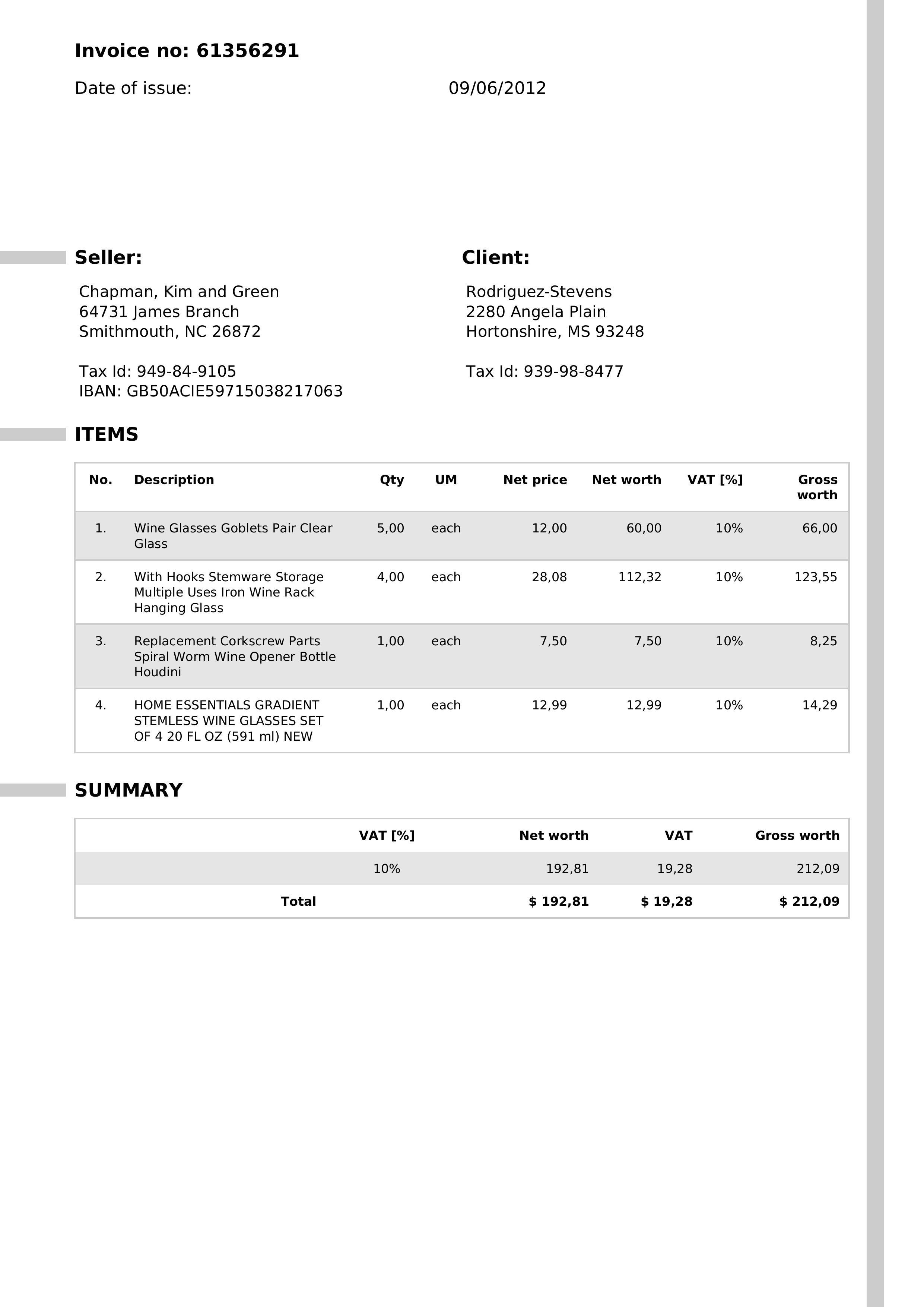
Figure 2. Sample of invoice image
As a baseline, I started with simply prompting the model, including the JSON schema in the instructions. The goal is to get Invoice objects directly from the model’s output, letting Pydantic handle the parsing. It requires valid raw JSON in the API response.
Out of 3 invoices, the model never generates a valid JSON for Pydantic. Taking a closer look, the outputs only include the given schema with no actual values from the image.
Check raw output for invoice 1
{
  "$defs": {
    "Address": {
      "properties": {
        "street_number": {
          "title": "Street Number",
          "type": "string"
        },
        "street_name": {
          "title": "Street Name",
          "type": "string"
        },
        "address_line_2": {
          "anyOf": [
            {
              "type": "string"
            },
            {
              "type": "null"
            }
          ],
          "default": null,
          "title": "Address Line 2"
        },
        "city": {
          "title": "City",
          "type": "string"
        },
        "state": {
          "title": "State",
          "type": "string"
        },
        "zip_code": {
          "title": "Zip Code",
          "type": "string"
        }
      },
      "required": [
        "street_number",
        "street_name",
        "city",
        "state",
        "zip_code"
      ],
      "title": "Address",
      "type": "object"
    },
    "Client": {
      "properties": {
        "name": {
          "title": "Name",
          "type": "string"
        },
        "address": {
          "$ref": "#/$defs/Address"
        },
        "tax_id": {
          "title": "Tax Id",
          "type": "string"
        }
      },
      "required": [
        "name",
        "address",
        "tax_id"
      ],
      "title": "Client",
      "type": "object"
    },
    "Item": {
      "properties": {
        "number": {
          "title": "Number",
          "type": "integer"
        },
        "description": {
          "title": "Description",
          "type": "string"
        },
        "quantity": {
          "title": "Quantity",
          "type": "number"
        },
        "unit_of_measure": {
          "title": "Unit Of Measure",
          "type": "string"
        },
        "net_price": {
          "title": "Net Price",
          "type": "number"
        },
        "net_worth": {
          "title": "Net Worth",
          "type": "number"
        },
        "vat_percentage": {
          "title": "Vat Percentage",
          "type": "number"
        },
        "gross_worth": {
          "title": "Gross Worth",
          "type": "number"
        }
      },
      "required": [
        "number",
        "description",
        "quantity",
        "unit_of_measure",
        "net_price",
        "net_worth",
        "vat_percentage",
        "gross_worth"
      ],
      "title": "Item",
      "type": "object"
    },
    "Seller": {
      "properties": {
        "name": {
          "title": "Name",
          "type": "string"
        },
        "address": {
          "$ref": "#/$defs/Address"
        },
        "tax_id": {
          "title": "Tax Id",
          "type": "string"
        },
        "iban": {
          "title": "Iban",
          "type": "string"
        }
      },
      "required": [
        "name",
        "address",
        "tax_id",
        "iban"
      ],
      "title": "Seller",
      "type": "object"
    },
    "Summary": {
      "properties": {
        "vat_percentage": {
          "title": "Vat Percentage",
          "type": "number"
        },
        "net_worth": {
          "title": "Net Worth",
          "type": "number"
        },
        "vat_amount": {
          "title": "Vat Amount",
          "type": "number"
        },
        "gross_worth": {
          "title": "Gross Worth",
          "type": "number"
        }
      },
      "required": [
        "vat_percentage",
        "net_worth",
        "vat_amount",
        "gross_worth"
      ],
      "title": "Summary",
      "type": "object"
    }
  },
  "properties": {
    "number": {
      "title": "Number",
      "type": "string"
    },
    "issue_date": {
      "format": "date",
      "title": "Issue Date",
      "type": "string"
    },
    "seller": {
      "$ref": "#/$defs/Seller"
    },
    "client": {
      "$ref": "#/$defs/Client"
    },
    "items": {
      "items": {
        "$ref": "#/$defs/Item"
      },
      "title": "Items",
      "type": "array"
    },
    "summary": {
      "$ref": "#/$defs/Summary"
    }
  },
  "required": [
    "number",
    "issue_date",
    "seller",
    "client",
    "items",
    "summary"
  ],
  "title": "Invoice",
  "type": "object"
}
Output parsing failed
The schema is willingly nested to make the task harder. Before constrained decoding, we would have adapted the prompt, added instructions, implemented guardrails, but we would never have had any guarantee.
Improvement 1: Constrained decoding
Now let’s use constrained decoding by adding the JSON schema in the response_format argument. This time all 3 invoices are parsed correctly with Pydantic and include actual values from the image.
Check step 1 output for invoice 1
{
  "number": "61356291",
  "issue_date": "0906-02-01",
  "seller": {
    "name": "Chapman, Kim and Green",
    "address": {
      "street_number": "64731",
      "street_name": "James Branch",
      "city": "Smithmouth",
      "state": "NC",
      "zip_code": "26872"
    },
    "tax_id": "949-84-9105",
    "iban": "GB50ACIE59715038217063"
  },
  "client": {
    "name": "Rodriguez-Stevens",
    "address": {
      "street_number": "2280",
      "street_name": "Angela Plain",
      "city": "Hortonshire",
      "state": "MS",
      "zip_code": "93248"
    },
    "tax_id": "939-98-8477"
  },
  "items": [
    {
      "number": 1,
      "description": "Wine Glasses Goblets Pair Clear Glass",
      "quantity": 5.0,
      "unit_of_measure": "each",
      "net_price": 12.0,
      "net_worth": 60.0,
      "vat_percentage": 10,
      "gross_worth": 66.0
    },
    {
      "number": 2,
      "description": "With Hooks Stemware Storage Multiple Uses Iron Wine Rack Hanging Glass",
      "quantity": 4.0,
      "unit_of_measure": "each",
      "net_price": 28.08,
      "net_worth": 112.32,
      "vat_percentage": 10,
      "gross_worth": 123.55
    },
    {
      "number": 3,
      "description": "Replacement Corkscrew Parts Spiral Worm Wine Opener Bottle Houdini",
      "quantity": 1.0,
      "unit_of_measure": "each",
      "net_price": 7.5,
      "net_worth": 7.5,
      "vat_percentage": 10,
      "gross_worth": 8.25
    }
  ],
  "summary": {
    "vat_percentage": 10,
    "net_worth": 192.81,
    "vat_amount": 19.28,
    "gross_worth": 212.09
  }
}
Is that it? Did we solve OCR with a small model? Not quite.
At first glance it looks correct, and this is already a huge improvement. Valid JSON, correct schema…until you read the issue_date… The first invoice also had 4 items, not 3.
Structural vs Semantic validity
Constrained decoding guarantees that the output will follow a given structure. This means that it will use only existing keys, will not forget any, and that every value will have the right type. However, it does not guarantee that the values will be correct. For example, our model reads 0906-02-01 instead of 2012-06-09 for the issue_date. While it is still a valid date, it does not make sense. This is the difference between structural and semantic validity.
This was expected, solving this problem could not be as simple as calling an API (OpenAI also pointed this out in the limitations in their article I mentioned above).
In order to encourage semantic validity, we must add domain knowledge.
Improvement 2: Domain rules
We now add field descriptions in all Pydantic models to help the VLM and prevent abnormal values. We also limit the value space based on domain knowledge, following this idea from Outlines. For example we know that:
- We did not get invoices before the year 2000
- Values should have 2 digits after the comma
Check improved pydantic models
class Invoice(BaseModel):
    number: str
    issue_date: str = Field(
        ...,
        pattern=r"^(20\d{2})-(0[1-9]|1[0-2])-(0[1-9]|[12]\d|3[01])$"
    )
    seller: Seller
    client: Client
    items: list[Item]
    summary: Summary

class Address(BaseModel):
    street_number: str
    street_name: str
    address_line_2: Optional[str] = None
    city: str
    state: str
    zip_code: str

class Seller(BaseModel):
    name: str
    address: Address
    tax_id: str
    iban: str


class Client(BaseModel):
    name: str
    address: Address
    tax_id: str


class Item(BaseModel):
    number: int
    description: str
    quantity: str = Field(..., pattern=r"^\d+,\d{2}$")
    unit_of_measure: str
    net_price: str = Field(..., pattern=r"^\d+,\d{2}$")
    net_worth: str = Field(..., pattern=r"^\d+,\d{2}$")
    vat_percentage: float
    gross_worth: str = Field(..., pattern=r"^\d+,\d{2}$")

class Summary(BaseModel):
    vat_percentage: float
    net_worth: str = Field(..., pattern=r"^\d+,\d{2}$")
    vat_amount: str = Field(..., pattern=r"^\d+,\d{2}$")
    gross_worth: str = Field(..., pattern=r"^\d+,\d{2}$")
These domain rules do not make the model see better really, but they push it to make sense of the image in a way that complies with the schema. Parsing still works perfectly because we keep the strong theoretical guarantees of constrained decoding, but now we also improved the semantic of the output. Interestingly, it also led the model to include the missing item, although this is more an indirect side effect rather than a true change in perception. The model sees the same thing, we just constrain it to interpret differently.
Check step 2 output for invoice 1
{
  "number": "61356291",
  "issue_date": "2012-06-09",
  "seller": {
    "name": "Chapman, Kim and Green",
    "address": {
      "street_number": "64731",
      "street_name": "James Branch",
      "city": "Smithmouth",
      "state": "NC",
      "zip_code": "26872"
    },
    "tax_id": "949-84-9105",
    "iban": "GB50ACIE59715038217063"
  },
  "client": {
    "name": "Rodriguez-Stevens",
    "address": {
      "street_number": "2280",
      "street_name": "Angela Plain",
      "city": "Hortonshire",
      "state": "MS",
      "zip_code": "93248"
    },
    "tax_id": "939-98-8477"
  },
  "items": [
    {
      "number": 1,
      "description": "Wine Glasses Goblets Pair Clear Glass",
      "quantity": "5,00",
      "unit_of_measure": "each",
      "net_price": "12,00",
      "net_worth": "60,00",
      "vat_percentage": 10,
      "gross_worth": "66,00"
    },
    {
      "number": 2,
      "description": "With Hooks Stemware Storage Multiple Uses Iron Wine Rack Hanging Glass",
      "quantity": "4,00",
      "unit_of_measure": "each",
      "net_price": "28,08",
      "net_worth": "112,32",
      "vat_percentage": 10,
      "gross_worth": "123,55"
    },
    {
      "number": 3,
      "description": "Replacement Corkscrew Parts Spiral Worm Wine Opener Bottle Houdini",
      "quantity": "1,00",
      "unit_of_measure": "each",
      "net_price": "7,50",
      "net_worth": "7,50",
      "vat_percentage": 10,
      "gross_worth": "8,25"
    },
    {
      "number": 4,
      "description": "HOME ESSENTIALS GRADIENT STEMLESS WINE GLASSES SET OF 4 20 FL OZ (591 ml) NEW",
      "quantity": "1,00",
      "unit_of_measure": "each",
      "net_price": "12,99",
      "net_worth": "12,99",
      "vat_percentage": 10,
      "gross_worth": "14,29"
    }
  ],
  "summary": {
    "vat_percentage": 10,
    "net_worth": "192,81",
    "vat_amount": "19,28",
    "gross_worth": "212,09"
  }
}
I added an evaluation step to make sure that the outputs were now correct, by comparing it to a ground truth. Turns out it still is not…
For example, there are sometimes additional information about the unit on the address line, usually to provide the unit number, but the model is putting these in the city field. This is not something I can fix with a domain rule in the schema.
Check how the model mixes the unit info with the street name for invoice 2
{
    "street_number": "968",
    "street_name": "Carr Mission Apt.",
    "address_line_2": "320",
    "city": "Bernardville",
    "state": "VA",
    "zip_code": "28211"
}
Improvement 3: Make the model “think”
The best language models today have reasoning ability. This means they can think before they provide their final answer, and their thinking usually lies between <thinking>...</thinking> which are special tokens.
For models with native thinking, constrained decoding prevents these tokens to be picked as they are not part of the grammar. However we can trick the model into thinking about its generation, even without thinking ability, by adding a special field to our schemas that the model will use as a scratchpad.
Check Pydantic model with thinking field
class Address(BaseModel):
    thinking: Optional[str] = Field(description="Use this field as a scratchpad to think about your answer regarding the address", exclude=True)
    street_number: str
    street_name: str = Field(description="This should be only the name of the street without anything else")
    address_line_2: Optional[str] = Field(description="This field should include info about the unit number including unit type like Apt, Suite or Unit. Leave blank if not provided")
    city: str
    state: str
    zip_code: str

class Invoice(BaseModel):
    thinking: str = Field(description="Use this field as a scratchpad to check your understanding and fix your answer if needed")
    number: str
    issue_date: str = Field(
        ...,
        pattern=r"^(20\d{2})-(0[1-9]|1[0-2])-(0[1-9]|[12]\d|3[01])$"
    )
    seller: Seller
    client: Client
    items: list[Item]
    summary: Summary
The model was already able to see all the data, it just did not put these in the right place. Using the scratchpad helps it to provide a more grounded answer in our case.
Check how thinking helps the model fix the address for invoice 2
{
    "thinking":"The address is 968 Carr Mission Apt. 320, Bernardville, VA 28211",
    "street_number":"968",
    "street_name":"Carr Mission",
    "address_line_2":"Apt. 320",
    "city":"Bernardville",
    "state":"VA",
    "zip_code":"28211"
}
Thinking fields can be put in every Pydantic object but at the cost of extra output tokens and latency. In this case, I tried to put it only where it was needed and found out from experience that it was required both in Invoice and Address. This is empirical and should not be generalized.
Improvement 4: Validate after generation
We have greatly improved the model’s output, however there is still a mistake in invoice 2: the model returns 2 items where there should be 3.
Unfortunately, this is not a domain error, the JSON is still valid and represents a correct invoice, just not the one it is supposed to read.
So, we need to implement guardrails to spot mistakes. This is a mandatory step for production use.
For example we know that:
- Net worth is net price multiplied by quantity
- Gross worth is net worth plus VAT
- The sum of items net worths must equal the summary net worth
We can implement these checks as Pydantic validators that will run after generation. Now at least we know when something is wrong, even without a ground-truth (which is usually not available) and set aside invoices that cannot be processed automatically.
Improvement 5: Retry mechanism
Actually, there is still a last bullet we can try. Language models are surprisingly good at fixing their answers whether by reasoning or being told to.
This is what Instructor is for. On each generation, it will automatically parse the output, run the Pydantic checks and if there are any validation errors, it will include these in a prompt and send it back to the model to auto-correct itself. Of course, this comes at the cost of increased latency.
We can set an arbitrary number of retries. In the end, if the validation still fails, we can put failing invoices into a separate stream for additional human review.
Conclusion
In this post, we have seen that small models greatly benefit from structured outputs. However, structure does not imply correctness. An output can match the schema yet still be wrong.
Constrained decoding is therefore a powerful tool, but only a building block for a more reliable pipeline. Domain constraints, validations, and retries, all help reduce errors on top of it, without ever eliminating them entirely.
In the end, no tool can guarantee correctness. Hence, for critical use cases, a human review remains necessary.